Try for free

AI cost visibility
for every feature.

See spend in real time by feature, workflow, and customer so teams can optimize faster and cut waste sooner.

zsh — typescript

import {

createAiTokenTrackerInterceptionScope,

withAiTokenTrackerInterceptionScope,

} from "@ai-token-tracker/sdk";

// Create scope-level filter context for this workflow/request boundary.

const scope = createAiTokenTrackerInterceptionScope({

// Workflow tag groups related calls in dashboard analytics.

Workflow: "social_post_generation",

});

// Add more business tags used for filtering and grouping.

scope.addCustomFilters({

// Job tag links usage/cost back to one business job.

JobId: "job-42",

// Customer tag enables tenant/customer-level cost analysis.

CustomerId: "cust-19",

});

// Run call inside scope helper so interception reads active filters.

await withAiTokenTrackerInterceptionScope(scope, async () => {

// Execute actual provider HTTP call here.

await fetch("https://api.openai.com/v1/responses", {

method: "POST",

// Set HTTP headers required by provider/auth flow.

headers: {

Authorization: `Bearer ${process.env.OPENAI_API_KEY}`,

"content-type": "application/json",

},

// Serialize request payload sent to provider.

body: JSON.stringify({

model: "gpt-4.1-mini",

input: "hello",

}),

});

});

$ // interception scope active

import {

createAiTokenTrackerInterceptionScope,

withAiTokenTrackerInterceptionScope,

} from "@ai-token-tracker/sdk";

// Create scope-level filter context for this workflow/request boundary.

const scope = createAiTokenTrackerInterceptionScope({

// Workflow tag groups related calls in dashboard analytics.

Workflow: "social_post_generation",

});

// Add more business tags used for filtering and grouping.

scope.addCustomFilters({

// Job tag links usage/cost back to one business job.

JobId: "job-42",

// Customer tag enables tenant/customer-level cost analysis.

CustomerId: "cust-19",

});

// Run call inside scope helper so interception reads active filters.

await withAiTokenTrackerInterceptionScope(scope, async () => {

// Execute actual provider HTTP call here.

await fetch("https://api.openai.com/v1/responses", {

method: "POST",

// Set HTTP headers required by provider/auth flow.

headers: {

Authorization: `Bearer ${process.env.OPENAI_API_KEY}`,

"content-type": "application/json",

},

// Serialize request payload sent to provider.

body: JSON.stringify({

model: "gpt-4.1-mini",

input: "hello",

}),

});

});

$ // interception scope active

import {

createAiTokenTrackerInterceptionScope,

withAiTokenTrackerInterceptionScope,

} from "@ai-token-tracker/sdk";

// Create scope-level filter context for this workflow/request boundary.

const scope = createAiTokenTrackerInterceptionScope({

// Workflow tag groups related calls in dashboard analytics.

Workflow: "social_post_generation",

});

// Add more business tags used for filtering and grouping.

scope.addCustomFilters({

// Job tag links usage/cost back to one business job.

JobId: "job-42",

// Customer tag enables tenant/customer-level cost analysis.

CustomerId: "cust-19",

});

// Run call inside scope helper so interception reads active filters.

await withAiTokenTrackerInterceptionScope(scope, async () => {

// Execute actual provider HTTP call here.

await fetch("https://api.openai.com/v1/responses", {

method: "POST",

// Set HTTP headers required by provider/auth flow.

headers: {

Authorization: `Bearer ${process.env.OPENAI_API_KEY}`,

"content-type": "application/json",

},

// Serialize request payload sent to provider.

body: JSON.stringify({

model: "gpt-4.1-mini",

input: "hello",

}),

});

});

$ // interception scope active

Blog example visualization
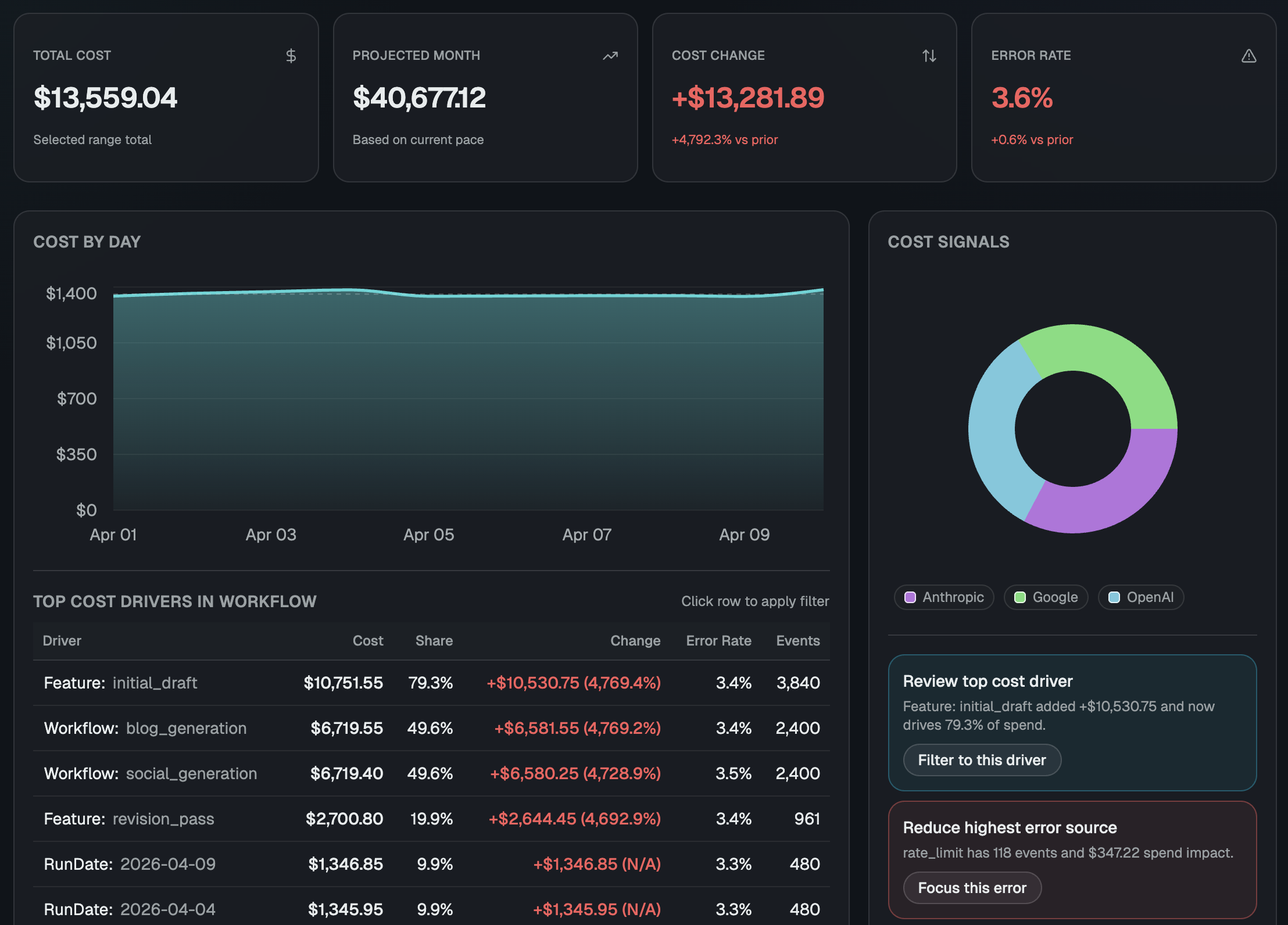
Usage analytics visualization

zsh — python

Cost telemetry
for every AI request path.

Capture usage, cost, and business metadata in one integration flow so teams can debug spend fast and ship with confidence.

150 free
requests per month
Every provider
supported in one view
  • Compare spend by feature, workflow, or customer segment in one view.
  • Surface the endpoints and models creating the most margin pressure.
  • Use the same view in product, engineering, and finance reviews.

THE PROBLEM

Most teams know total LLM spend. Few can explain what caused it.

  • Finance sees total model spend, but product and engineering cannot tie cost back to the exact feature, workflow, or customer segment.
  • Cost spikes are usually discovered after invoices close, when it is too late to prevent overages and difficult to explain what changed.
  • Without request-level attribution, teams struggle to answer basic margin questions and delay roadmap decisions that depend on cost confidence.

THE SOLUTION

One platform for AI usage analytics and spend control

AI Token Tracker helps teams move from total-cost reporting to operational cost intelligence. You can see where spend is created, why it changed, and what to optimize next.

Instrument Once

Add SDK once and capture request-level usage across providers.

Attribute Every Dollar

Track cost by project, model, endpoint, and metadata.

Act Before Budget Drift

Set spend thresholds and get alerts before costs compound.

Flow diagram showing app requests sent through AI Token Tracker SDK to analytics and alerting

FEATURES

Everything you need to manage LLM cost at scale

From ingest to investigation, every feature is focused on one goal: helping you make faster, better cost decisions with less manual analysis.

Usage Alerts You Control

Set spend and usage thresholds by project or model, then notify teams the moment limits are crossed.

Request-Level Event Logs

Search and filter events by date, provider, status, and metadata to investigate reliability issues and cost spikes faster.

Metadata Filters for Any Workflow

Pass fields like JobId, Feature, Workflow, or CampaignId so dashboard views match how your business tracks performance.

Provider-Aware Cost Parsing

Ingest OpenAI, Anthropic, Gemini, and more with provider-aware parsing plus fallback coverage for heterogeneous AI stacks.

Audit-Ready Cost Receipts

Cost is calculated at ingest against active pricing tables so each event has a durable, explainable cost receipt.

Built for Production Systems

Integrate through SDK wrappers, HttpClient handlers, or diagnostics paths to fit enterprise and startup architectures.

HOW IT WORKS

From unknown spend to controlled cost in three steps

Setup is intentionally lightweight. With just a few lines of code in your AI call path, you can start collecting analytics across all LLM usage and move from guesswork to clear cost decisions.

  1. 01

    Connect Your AI Traffic

    Add the AI Token Tracker SDK in your core AI request path, then start sending request-level token and cost events without changing your existing workflow.

  2. 02

    Analyze Cost Drivers

    Use built-in dashboards to break down spend by feature, workflow, customer segment, provider, and model so you can pinpoint exactly what is driving cost.

  3. 03

    Optimize and Monitor

    Set alerts, ship prompt or routing optimizations, and monitor trends over time to prove savings and keep AI spend predictable as traffic grows.

zsh — typescript

import { AiTokenTrackerIngestionClient } from "@ai-token-tracker/sdk";

const ingestionClient = new AiTokenTrackerIngestionClient({

authToken: process.env.AI_TOKEN_TRACKER_API_KEY,

enableAutoInterception: true, // Automatically track requests

enableDiagnosticsFallback: true,

});

START NOW

Try for free and surface savings fast

Connect one project, map real AI cost drivers, and get a clear optimization plan in your first week.

Start with a single workflow, validate where spend is leaking, and roll out cost controls as your AI usage scales.

Free

  • 150 requests per month
  • Add users for free to your organization
  • Usage and cost alerts
  • Full dashboard access
  • Event logs access
Try for free